Every company has that employee. You know the one – they’ve been around forever, know exactly how everything works and somehow have an answer for every question that crops up – from the banal to the bizarre.
Having experienced team members is fantastic! But having all your metaphorical institutional knowledge stored in one basket (e.g., inside their brains)? Slightly terrifying. Because eventually Mike takes a vacation, Sarah gets promoted or Dave retires. And the team is left saying, “Wait…does anybody else know how to do this?”
Your people already possess an enormous amount of valuable knowledge. The challenge is capturing that know-how and making it available to everyone else. One of the easiest ways to do that is by creating a searchable library of short, user-generated videos.
When done correctly, your training library becomes a patookie-saving resource people can actually use to get help right when they need it. And the best part? Building one doesn’t require a production studio, professional videographers or months of course development.
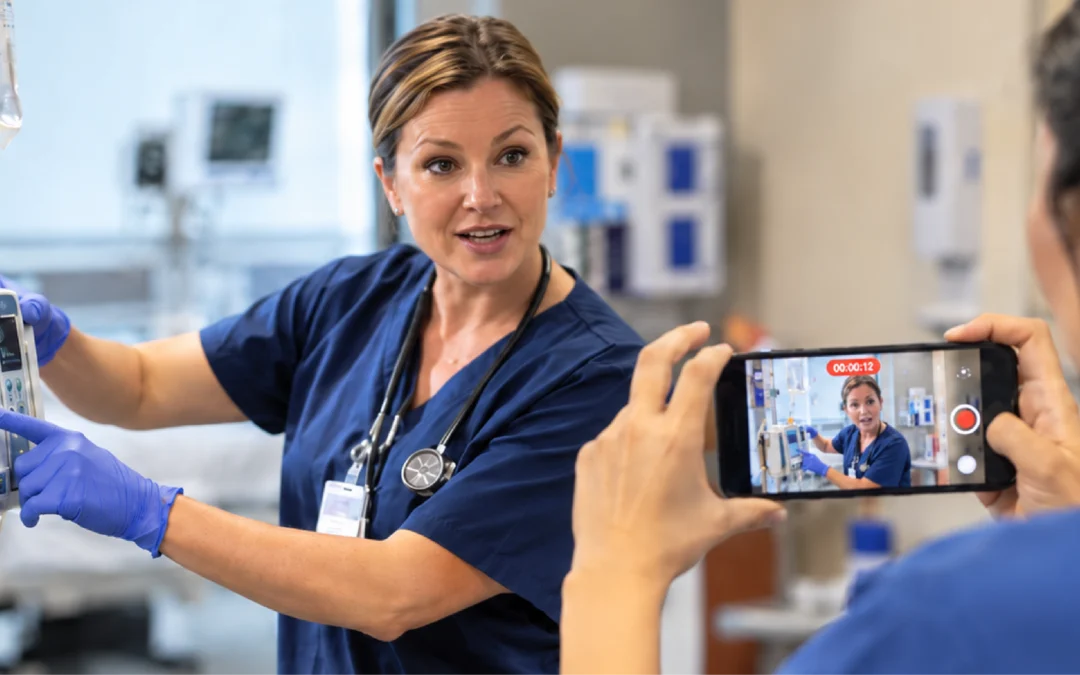
Your team already has the two things needed to get started: Expertise and a phone.
Stop Thinking Like an LMS
Traditional workplace training tends to organize information into neat little boxes like “customer service training,” “equipment training,” “new hire training,” etc. While this structure makes sense administratively, it isn’t necessarily how employees look for information.
For instance, when you’re facing a mechanical issue, you aren’t thinking, “Hmm, I need to revisit Module 6 of Equipment Fundamentals.” You’re actually thinking, “How in the world do I fix this?”
Searchable knowledge libraries are built around this reality. Instead of forcing team members to click through an entire course to find one answer, two-minute videos are tagged and optimized for a quick search. Employee development becomes something accessible at the point of need rather than something that happens only when a course gets assigned.
Step 1: Find the Knowledge Worth Capturing
Before you start recording, identify the knowledge that’s already moving informally through your organization.
Listen for questions employees repeatedly ask managers. Look for processes your best people perform differently. Pay attention to mistakes that happen over and over. Ask experienced team members what they wish new hires knew. These are your first videos.
If your best technician has figured out a simple way to prevent a recurring problem, capture it. If a salesperson has a great response to a common objection, record it. If a manager explains the same process 10 times a week, please – for the sake of that manager’s sanity – make it a video!
Every question that gets answered repeatedly is an opportunity to turn temporary knowledge sharing into permanent employee development.
Step 2: Keep Each Video Focused on One Question
Once you’ve identified your topic, resist the urge to cram everything you know about it into one video. People need quick answers, so keep user-generated training videos to two minutes or less, built around a simple four-step structure:
Question → Answer → The Why → Result
The Question establishes when someone would use the information. The Answer shows what to do. The Why explains why the process works or matters. The Result provides the key takeaway.
This structure works especially well for a searchable library because every video can answer one specific question.
Instead of a 30-minute “Customer Service Basics” video, for example, you might create separate videos on how to de-escalate an angry customer, when to escalate a complaint to a manager, what to say when an order is delayed and how to document a customer issue.
Employees can search for the exact situation and find an exact answer in seconds.
Step 3: Let the Experts Do the Teaching
Once you decide to capture employee knowledge, it’s tempting to take the information away from team members and hand it to someone else to turn it into “official training.” Your subject matter experts don’t need someone else to explain what they know. Let them explain it. There are multiple, simple formats your people can use.
With peer-to-peer teaching, knowledge naturally moves between coworkers. As a result, employee development feels so much more relevant than generic training delivered by someone who has never actually done the job.
Step 4: Don’t Overproduce the Videos
There is a time and place for highly produced corporate videos, but your searchable knowledge library isn’t it. Authentic videos spark greater trust in peers, so don’t panic if your recording is imperfect.
But imperfect shouldn’t be confused with sloppy. Video quality can be greatly improved with simple elements like filming with a phone at or above eye level, and using a tripod or coworker to hold the camera steady. Focus primarily on clear audio, good lighting and making sure viewers can see the task.
Also, capture the video in one take if you can. It will minimize editing and keep the final video under two minutes. Remember, the ultimate goal for employee development is to transfer what the presenter knows to someone who needs to know it. That’s it. The rest is just extra. Don’t be extra.
Step 5: Make Searchability the Priority
Creating the videos is only half the job. People still need to be able to find them. Think about how an employee would describe the problem and label the video to match. In other words, titles should be specific and intuitive. For example, “How to Handle a Customer Refund” is more useful than “Customer Service Procedure 4.2.”
Organize videos around job roles, processes, skills or frequently encountered problems. Keep topics narrow enough that search results point team members toward a useful answer quickly.
Tagging and organizing is where a searchable platform turns a pile of videos into an actual employee development system. The value isn’t simply having the information. It’s being able to move from “I don’t know how to do this” to “I found the answer” in the fewest clicks possible.
Step 6: Keep the Library Alive
In business, the only constant really is change. Processes change, technology changes, employees discover better methods and information becomes outdated.
If nobody maintains your library, today’s incredibly useful resource eventually becomes tomorrow’s file labeled “Training – FINAL – Updated – USE THIS ONE.”
Build updating into the process. When something changes, replace the old video. When teams discover a better method, capture it. When a new question starts popping up, create another lesson.
Employee development should be able to keep up with the speed of business.
Step 7: Take Employees from Learners to Contributors
Once team members realize they can contribute what they know, your knowledge library can start growing organically.
A supervisor doesn’t have to be the source of every answer. Your top-performing people can demonstrate best practices. Experienced workers can document lessons learned. New hires can even identify gaps because they’re the ones asking questions with fresh eyes.
Knowledge no longer travels only from the top down. It moves across the organization. Employees become both learners AND teachers.
What Happens When Your Best Employee Leaves?
Eventually, someone will. People retire or change jobs or get promoted or move to another department. This turnover can create a knowledge problem. If your processes, techniques and institutional memory live primarily inside individual employees’ heads, years of experience can walk out the door on someone’s last day.
A searchable video library helps preserve it. Instead of asking tenured team members to somehow transfer everything they know during their final two weeks, knowledge capture becomes an ongoing part of employee development. Small pieces of expertise are documented continuously while people are still doing the work.
Your Best Training Library is Already Walking Around Your Company
You don’t need to create as much training content as you think – much of it already exists. Your best people are your knowledge library. Your job is simply to capture what they know, organize it and make it searchable.
Over time, these two-minute videos turn into something much bigger: A living employee development resource built from the collective experience of the people who know your business best.
And the next time someone asks, “Does anybody know how to do this?” There’s a video for that. 😉
Learn how you can start preserving your company’s institutional knowledge by scheduling a meeting to speak with a Tyfoom training consultant today.